 Stablecoin Accepted
Can I pay Namecheap with crypto?
Yes. Namecheap accepts BTC (Bitcoin); ETH (Ethereum); BCH (Bitcoin Cash), according to its official documentation as of 2026-10-17. USDT and USDC are not listed in its official documentation.
Domain registrar and host. Crypto goes into your account balance first: Bitcoin via BitPay or BTCPay, plus Bitcoin Cash and Ethereum via BitPay. No stablecoin is named.
Accepted coins and networks
| Coin | Networks | Processor | Billing | Notes |
|---|---|---|---|---|
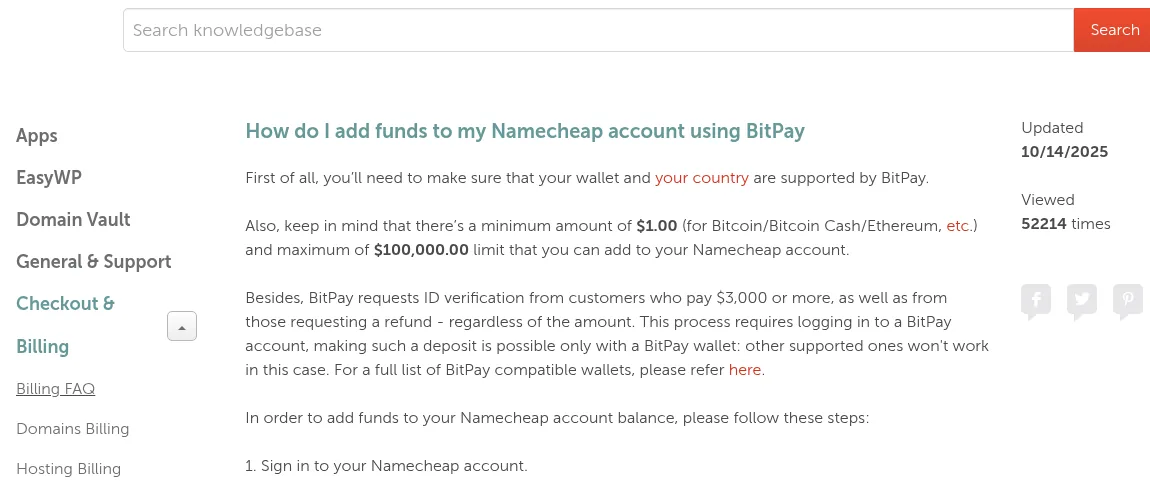
| BTC | Bitcoin | BitPay | Prepaid balance / credits | Account top-up only (Profile > Billing > Balance > Top-Up), $1 minimum. BitPay asks for ID verification on payments of $3,000 or more. Namecheap's help article lists "Bitcoin/Bitcoin Cash/Ethereum, etc." without a full list. |
| BTC | Bitcoin | BTCPay Server | Prepaid balance / credits | Account top-up through BTCPay; Namecheap says any Bitcoin wallet works. Bitcoin only on this processor. |
| BCH | Bitcoin Cash | BitPay | Prepaid balance / credits | Chosen on the BitPay invoice page after picking a wallet. |
| ETH | Ethereum | BitPay | Prepaid balance / credits | Chosen on the BitPay invoice page after picking a wallet. |
How to pay
- Sign in → Dashboard → Top-up (or Profile → Billing → Balance → Top-Up) → choose the crypto payment method → pick BitPay or BTCPay → Add Funds. Purchases are then paid from the balance. Path taken from the official help articles; not yet seen at checkout by us.
- Choose the coin and the network shown at checkout. Pay only on a network listed above for that coin.
- Send the exact amount from a wallet you control, before the payment window expires. Sending on a different network can lose the funds.
- Keep the transaction ID until the order is confirmed. If the payment does not show up, contact Namecheap support with it.
Evidence
Verbatim quotes from Namecheap’s own pages. See how we verify.
“In the next window, now choose your preferred currency (Bitcoin/Bitcoin Cash/Ethereum, etc.):”
https://www.namecheap.com/support/knowledgebase/article.aspx/10089/7/how-do-i-add-funds-to-my-namecheap-account-using-bitpay/ · captured 2026-10-17“With BTCPay, you can add any amount from $1.00 to $100,000.00 to your Namecheap account. Any Bitcoin wallet is applicable.”
https://www.namecheap.com/support/knowledgebase/article.aspx/10312/2200/how-do-i-add-funds-to-my-namecheap-account-using-btcpay/ · captured 2026-10-17“NOTE: BitPay and BTCPay deposits are non-refundable.”
https://www.namecheap.com/support/knowledgebase/article.aspx/232/7/how-can-i-add-funds-to-my-namecheap-account/ · captured 2026-10-17
Screenshots
Cropped to the payment wording; any personal or account data is blurred before publishing. Click a screenshot to enlarge it here; use the arrows, arrow keys or a swipe to switch.
Questions
Does Namecheap accept USDT?
Not according to its official sources: Namecheap does not list USDT as a payment option.
Does Namecheap accept USDC?
Not according to its official sources: Namecheap does not list USDC as a payment option.
Which payment processor does Namecheap use for crypto?
Namecheap takes crypto payments through BTCPay Server and BitPay.
Does Namecheap require identity checks to pay with crypto?
Identity checks at payment: Not stated.
Does Namecheap refund crypto payments?
Refunds for crypto payments: No.
Can Namecheap auto-renew with crypto?
Auto-renew with crypto: Not stated.
History
- — Added. Verified via official docs.
Something changed? Send a correction.